
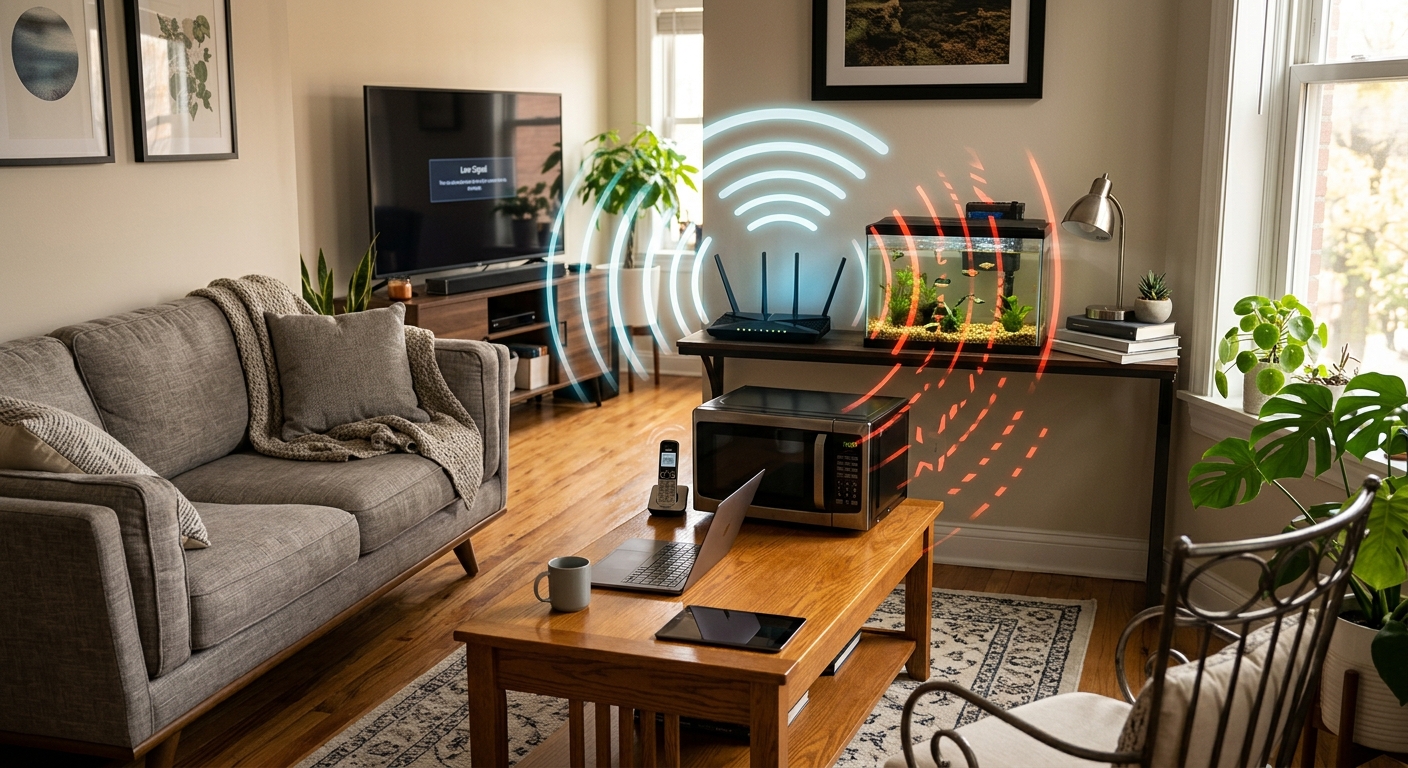
Identifying Common Household Items That Interfere with Wi-Fi Signals
Understanding the specific household items that disrupt Wi-Fi signals can be pivotal in improving network performance. Many users often overlook common sources of interference, leading to frustrating connectivity issues. Recognizing these culprits helps inform practical actions to enhance signal quality within the home.
Metal Objects and Furniture
Metal furniture and appliances are significant barriers to Wi-Fi signals. Items like refrigerators, metal cabinets, and even mirrors can reflect and absorb radio waves, resulting in weak signal areas throughout the home. Evaluating the placement of these items in relation to the router can aid in reducing their impact, as merely moving the router away from metal surfaces can lead to noticeable improvements in signal strength.
Water and Aquariums
Water-filled objects, particularly aquariums, can severely weaken Wi-Fi signals. Saltwater tanks are even more problematic due to their higher electrical conductivity, leading to greater absorption of radio waves. If aquariums are essential for your household, adjustments in router placement or channel settings may help to mitigate their disruptive effects.
Microwave Ovens and Bluetooth Devices
Microwave ovens and Bluetooth devices both operate on the crowded 2.4 GHz frequency, which overlaps with many Wi-Fi routers. When microwaves are in use, they can cause significant Wi-Fi disruptions, temporarily degrading performance. Evaluating how frequently these devices are used and adjusting your router’s settings during peak times can help manage interference levels.
Smart Home Gadgets
The increasing number of smart devices, from security cameras to smart plugs, often compete for the same bandwidth as Wi-Fi signals. This competition can lead to slower speeds and increased lag. Strategically managing connectivity—such as prioritizing bandwidth for essential devices—can help maintain smoother operation across your smart home network.
Other Electronic Devices
Devices like cordless phones, baby monitors, and various electronic toys can emit electromagnetic interference even if they are not primarily used for communication. This interference can cause devices to misbehave or become unresponsive. Addressing the arrangement of these devices and their proximity to the router might prevent unnecessary disruptions to Wi-Fi connectivity.
Building Materials and Furniture
Physical Barriers to Signal Strength
Structural elements such as reinforced concrete walls and thick furniture can block or weaken Wi-Fi signals. These materials significantly attenuate signals, especially if a router is confined to a corner or behind dense objects. A thoughtful arrangement of both furniture and equipment can eliminate dead zones, creating a more reliable network throughout the home.
Understanding Mechanisms of Wi-Fi Signal Interference
The types of interference affecting Wi-Fi performance can be critical in devising solutions. Signals can be disrupted by both physical barriers and electromagnetic interference, which reduces the overall strength and quality of network connections. Familiarizing oneself with these mechanisms can guide homeowners in pinpointing specific issues within their environments.
Electromagnetic Interference (EMI)
EMI arises from electronic devices when they emit unwanted signals that interfere with the normal operation of Wi-Fi devices. This can involve various coupling modes, such as conductive and radiative interference. Identifying which devices are generating EMI allows users to make informed decisions about relocating their router or adjusting their setup to minimize disruptions.
Signal Attenuation and Blockage
As Wi-Fi signals travel through materials like metal and concrete, they weaken due to attenuation. The impact of walls, furniture, and other barriers on signal strength can be profound. Homeowners can drastically improve performance by strategically positioning routers to minimize these obstructions, thus facilitating clearer signal paths.
Reflection and Multipath Interference
Surfaces that reflect signals, such as mirrors and windows, can inadvertently create multipath interference. This scenario results in conflicting signals, leading to reduced coverage. By addressing these reflective surfaces and rerouting signals, users can enhance their Wi-Fi performance and mitigate issues like dropped connections.
Effective Strategies to Mitigate Wi-Fi Interference
To minimize interference and ensure optimal Wi-Fi connectivity, users can adopt various strategies tailored to their unique household circumstances. These strategies encompass everything from router placement to advanced technologies designed to enhance performance. Implementing these best practices can lead to a noticeable difference in the strength and reliability of Wi-Fi signals.
Optimal Router Placement
Strategically placing the router in a central location without obstructions can significantly enhance signal distribution. Positioning the router away from large metal objects and ensuring it has a clear line of sight to devices can reduce interference and improve overall coverage. Experimenting with different placements can often yield better results without the need for further investments.
Managing Household Interference
Adjusting the placement of large appliances, metal objects, and reflective surfaces around your Wi-Fi router is crucial. By rearranging or relocating devices that disrupt signals, users can create a more conducive environment for strong Wi-Fi connections. This may involve moving furniture or even using wireless extenders in more congested areas.
Utilizing Frequency Bands
Many modern routers support multiple frequency bands (2.4 GHz and 5 GHz). Shifting devices to less crowded bands minimizes interference and optimizes bandwidth. Analyzing neighboring networks can inform channel selection, further enhancing network performance and reducing overlap.
Advanced Networking Solutions
For larger or more complex homes, considering advanced solutions like mesh networks can improve coverage significantly. These systems provide seamless connectivity throughout the home, effectively eliminating dead zones. Evaluating the needs of your home can guide the selection of appropriate hardware to enhance your Wi-Fi experience.
The content is provided by Jordan Fields, Home Upgrade News